Using a Test Project to Run and Debug a .NET Application - Part 2
In this part, we’ll turn the test project into a reusable integration testing setup for a .NET app. We’ll use xUnit fixtures, shared DI, and a single PostgreSQL container to make it easier to run and debug features cleanly.
In Part 1, we set up Entity Framework with a real PostgreSQL database running in Docker, which was a big step forward.
The goal of this article is to build a solid test framework that makes testing features and services much easier.
To show how the framework works, we’ll add two features to the code first:
- Add a staff member
- Get a staff member’s details
Like I mentioned in Part 1, this is not meant to be a step-by-step tutorial. You can always check the source code. I’ll quickly go over the main parts of both features, and then we’ll focus on improving the test framework.
Build the “Add a staff member” feature
The commit #30890b58 includes:
-
The
IRequestandIRequestHandlerinterfaces underApplication > Common. These are the core pieces for a simple Mediator-style pattern, which makes it easier to model features as commands and queries.public interface IRequest<out TResponse>; public interface IRequestHandler<in TRequest, TResponse> where TRequest : IRequest<TResponse> { Task<TResponse> HandleAsync( TRequest request, CancellationToken cancellationToken); } -
The
AddStaffMemberCommandand its handler underApplication > Featurespublic sealed record AddStaffMemberCommand( string Name) : IRequest<Guid>; internal sealed class AddStaffMemberCommandHandler( AppDbContext dbContext) : IRequestHandler<AddStaffMemberCommand, Guid> { public async Task<Guid> HandleAsync( AddStaffMemberCommand request, CancellationToken cancellationToken) { var newStaffMember = new StaffMember { Id = Guid.NewGuid(), Name = request.Name }; dbContext.StaffMembers.Add(newStaffMember); await dbContext.SaveChangesAsync(cancellationToken); return newStaffMember.Id; } } -
DI setup for the new command and handler in
StartUppublic static class StartUp { public static IServiceCollection AddApplication( this IServiceCollection services, ApplicationConfiguration configuration) { services .AddScoped<IRequestHandler<AddStaffMemberCommand, Guid>, AddStaffMemberCommandHandler>() .AddDbContext<AppDbContext>(options => { options.UseNpgsql(configuration.ConnectionString); }); return services; } } -
The same commit also introduces
AddStaffMemberCommandTests. It should be clear that this test is doing too much setup on its own, but we’ll clean that up soon.public sealed class AddStaffMemberCommandTests { [Fact] public async Task WhenNewStaffMemberIsAdded_ExpectStaffMemberAdded() { // Arrange var services = new ServiceCollection(); var dbTestsContainer = new DbTestsContainer(); var connectionString = await dbTestsContainer .StartAsync(); var applicationConfiguration = new ApplicationConfiguration( connectionString); services .AddApplication(applicationConfiguration); var serviceProvider = services .BuildServiceProvider(); var dbContext = serviceProvider .GetRequiredService<AppDbContext>(); await dbContext .Database .MigrateAsync(); // Act var handler = serviceProvider .GetRequiredService<IRequestHandler<AddStaffMemberCommand, Guid>>(); var newStaffMember = new AddStaffMemberCommand("Joe"); var result = await handler .HandleAsync( newStaffMember, CancellationToken.None); // Assert var dbStaffMember = await dbContext .StaffMembers .SingleOrDefaultAsync(x => x.Id == result); Assert.NotNull(dbStaffMember); Assert.Equal(result, dbStaffMember.Id); Assert.Equal("Joe", dbStaffMember.Name); } }
Nice. We now have an integration test that runs the real command against a real PostgreSQL database.
Build the “Get staff member” feature
The commit #6073cf9e introduces the “get staff member” query.
-
Add
GetStaffMemberQueryand its handler:public sealed record StaffMemberQueryResponseDto( Guid Id, string Name); public sealed record GetStaffMemberQuery( Guid Id) : IRequest<StaffMemberQueryResponseDto>; internal sealed class GetStaffMemberQueryHandler( AppDbContext dbContext) : IRequestHandler<GetStaffMemberQuery, StaffMemberQueryResponseDto?> { public async Task<StaffMemberQueryResponseDto?> HandleAsync( GetStaffMemberQuery request, CancellationToken cancellationToken) { var staffMember = await dbContext .StaffMembers .SingleOrDefaultAsync(x => x.Id == request.Id, cancellationToken); if (staffMember is null) return null; return new StaffMemberQueryResponseDto( staffMember.Id, staffMember.Name); } } -
Register the query handler in
StartUpDI:public static class StartUp { public static IServiceCollection AddApplication( this IServiceCollection services, ApplicationConfiguration configuration) { services .AddScoped<IRequestHandler<AddStaffMemberCommand, Guid>, AddStaffMemberCommandHandler>() .AddScoped<IRequestHandler<GetStaffMemberQuery, StaffMemberQueryResponseDto?>, GetStaffMemberQueryHandler>() // NEW .AddDbContext<AppDbContext>(options => { options.UseNpgsql(configuration.ConnectionString); }); return services; } } -
Create
GetStaffMemberQueryTests:public sealed class GetStaffMemberQueryTests { [Fact] public async Task WhenStaffMemberExists_ExpectStaffMember() { // Arrange var services = new ServiceCollection(); var dbTestsContainer = new DbTestsContainer(); var connectionString = await dbTestsContainer .StartAsync(); var applicationConfiguration = new ApplicationConfiguration( connectionString); services .AddApplication(applicationConfiguration); var serviceProvider = services .BuildServiceProvider(); var dbContext = serviceProvider .GetRequiredService<AppDbContext>(); await dbContext .Database .MigrateAsync(); var newStaffMember = new StaffMember { Id = Guid.NewGuid(), Name = "Joe" }; dbContext .StaffMembers .Add(newStaffMember); await dbContext .SaveChangesAsync(CancellationToken.None); // Act var handler = serviceProvider .GetRequiredService<IRequestHandler<GetStaffMemberQuery, StaffMemberQueryResponseDto?>>(); var query = new GetStaffMemberQuery(newStaffMember.Id); var result = await handler .HandleAsync( query, CancellationToken.None); // Assert Assert.NotNull(result); Assert.Equal(newStaffMember.Id, result.Id); Assert.Equal(newStaffMember.Name, result.Name); } }
At this point, if you run the full test suite, you’ll notice two problems:
- Each test starts its own database container. That doesn’t scale.
- The Arrange step is mostly the same everywhere: create services, start the container, build the provider, run migrations, and so on.
So it’s time to make the tests more solid by using xUnit fixtures and collections. I won’t explain xUnit in detail here. If anything feels unclear, the xUnit docs are the best place to look.
The goal is simple:
- Start the Docker database once for the whole test collection
- Centralize DI setup
- Give each test its own scoped container, similar to a web request scope
Centralizing DI and database setup
The commit #c0830a86 adds the core pieces that all tests will reuse. These are the parts that make writing tests easier. Let’s go through them.
-
AppIntegrationTestsFixturecentralizes the work of starting the database and building the DI container. With the next pieces in place,InitializeAsyncwill run only once because this fixture will be attached to a collection.public sealed class AppIntegrationTestsFixture : IAsyncLifetime { private readonly ServiceCollection _serviceCollection = []; private ServiceProvider _serviceProvider = null!; public ServiceProvider GetRequiredServiceProvider() => _serviceProvider; public async Task InitializeAsync() { // Initialize Docker DB container var dbTestsContainer = new DbTestsContainer(); var connectionString = await dbTestsContainer.StartAsync(); var applicationConfiguration = new ApplicationConfiguration(connectionString); // Setup DI container _serviceCollection .AddApplication(applicationConfiguration); // Initialize Application _serviceProvider =_ serviceCollection.BuildServiceProvider(); // Apply EF migrations var dbContext = _serviceProvider.GetRequiredService<AppDbContext>(); await dbContext.Database.MigrateAsync(); } public async Task DisposeAsync() { await _serviceProvider.DisposeAsync(); } } -
AppIntegrationTestsServiceholds the repeated logic that most tests need:public class AppIntegrationTestsService( AppIntegrationTestsFixture fixture) { private static readonly InvalidOperationException NullScopeException = new("Test service scope has not been initialized."); private IServiceScope? _scope; public Task InitializeAsync() { _scope = fixture.GetRequiredServiceProvider().CreateScope(); return Task.CompletedTask; } public T GetRequiredService<T>() where T : notnull { return _scope is null ? throw NullScopeException : _scope.ServiceProvider.GetRequiredService<T>(); } public async Task<TResponse> ExecuteAsync<TRequest, TResponse>( TRequest request, CancellationToken cancellationToken = default) where TRequest : IRequest<TResponse> { if (_scope is null) { throw NullScopeException; } var requestHandler = _scope .ServiceProvider .GetRequiredService<IRequestHandler<TRequest, TResponse>>(); var result = await requestHandler.HandleAsync( request, cancellationToken); return result; } public Task DisposeAsync() { _scope?.Dispose(); return Task.CompletedTask; } }
A couple of important points:
- Even though this class does not implement
IAsyncLifetime, it still exposesInitializeAsyncandDisposeAsync. That makes it easy for tests to call those methods in a consistent way. GetRequiredService<T>()uses the current scope. You can think of each[Fact]as its own request, so giving each test a fresh scope is a good habit.ExecuteAsyncis just a helper for running commands and queries without repeating the same handler setup in every test.
-
Share the same container across tests by adding a collection so xUnit does not run them in parallel, and so they all use the same fixture and database:
[CollectionDefinition(nameof(AppIntegrationTestsCollection))]
public class AppIntegrationTestsCollection
    : ICollectionFixture<AppIntegrationTestsFixture>;
With these pieces in place, the next step is to refactor the tests for the two features.
Refactoring an existing test to use the framework
In commit #daecc022, you can see the refactor that makes the tests much cleaner and shorter.
Here’s what GetStaffMemberQueryTests looks like after the refactor:
[Collection(nameof(AppIntegrationTestsCollection))]
public sealed class GetStaffMemberQueryTests(
    AppIntegrationTestsService testService)
    : IClassFixture<AppIntegrationTestsService>, IAsyncLifetime
{
    public Task InitializeAsync()
        => testService.InitializeAsync();

    public Task DisposeAsync()
        => testService.DisposeAsync();

    [Fact]
    public async Task WhenStaffMemberExists_ExpectStaffMember()
    {
        // Arrange
        var dbContext = testService.GetRequiredService<AppDbContext>();

        var newStaffMember = new StaffMember
        {
            Id = Guid.NewGuid(),
            Name = "Joe"
        };

        dbContext.StaffMembers.Add(newStaffMember);

        await dbContext.SaveChangesAsync(CancellationToken.None);

        // Act

        var query = new GetStaffMemberQuery(newStaffMember.Id);

        var result = await testService
            .ExecuteAsync<GetStaffMemberQuery, StaffMemberQueryResponseDto?>(
                query, CancellationToken.None);

        // Assert
        Assert.NotNull(result);
        Assert.Equal(newStaffMember.Id, result.Id);
        Assert.Equal(newStaffMember.Name, result.Name);
    }

    [Fact]
    public async Task WhenStaffMemberDoesNotExists_ExpectNull()
    {
        // Arrange

        // Act

        var query = new GetStaffMemberQuery(Guid.NewGuid());

        var result = await testService
            .ExecuteAsync<GetStaffMemberQuery, StaffMemberQueryResponseDto?>(
                query, CancellationToken.None);

        // Assert
        Assert.Null(result);
    }
}
Here’s the short version of what’s going on:
[Collection(nameof(AppIntegrationTestsCollection))]puts this test class in a non-parallel collection that shares the same database container.AppIntegrationTestsServiceis injected, so each test does not have to repeat all the setup code.- The test class implements
IAsyncLifetimeand forwardsInitializeAsyncandDisposeAsynctoAppIntegrationTestsService. That gives you a clean before-each-test and after-each-test hook. - You can get any service from DI through
testService.GetRequiredService<T>(). - You can run any feature, command, or query through
testService.ExecuteAsync(...).
Apply the same refactor to AddStaffMemberCommandTests, and when you run the suite you should see:
- Tests are not executed in parallel
- Only one Docker database container is started
One small note: Testcontainers also starts a container called ryuk.... That is expected. It is how Testcontainers cleans up the containers it created.
Conclusion
The main goal here was to show a simple idea: you can use an integration test project as the entry point for your .NET app. And I think that worked well. We tested two features against a real PostgreSQL database, without a front end, without a web host, and without bringing HTTP concerns into the core of the app.
The examples are intentionally small, but the workflow scales well: find the test for the feature you want to work on, set a breakpoint, hit the IDE play button, and debug right there.
One nice side effect is that we ended up with 100% test coverage. I did not bring up coverage in the earlier parts on purpose, because the goal was never to hit some target number. The point is that when tests are how you run and debug the app, strong coverage tends to happen naturally.
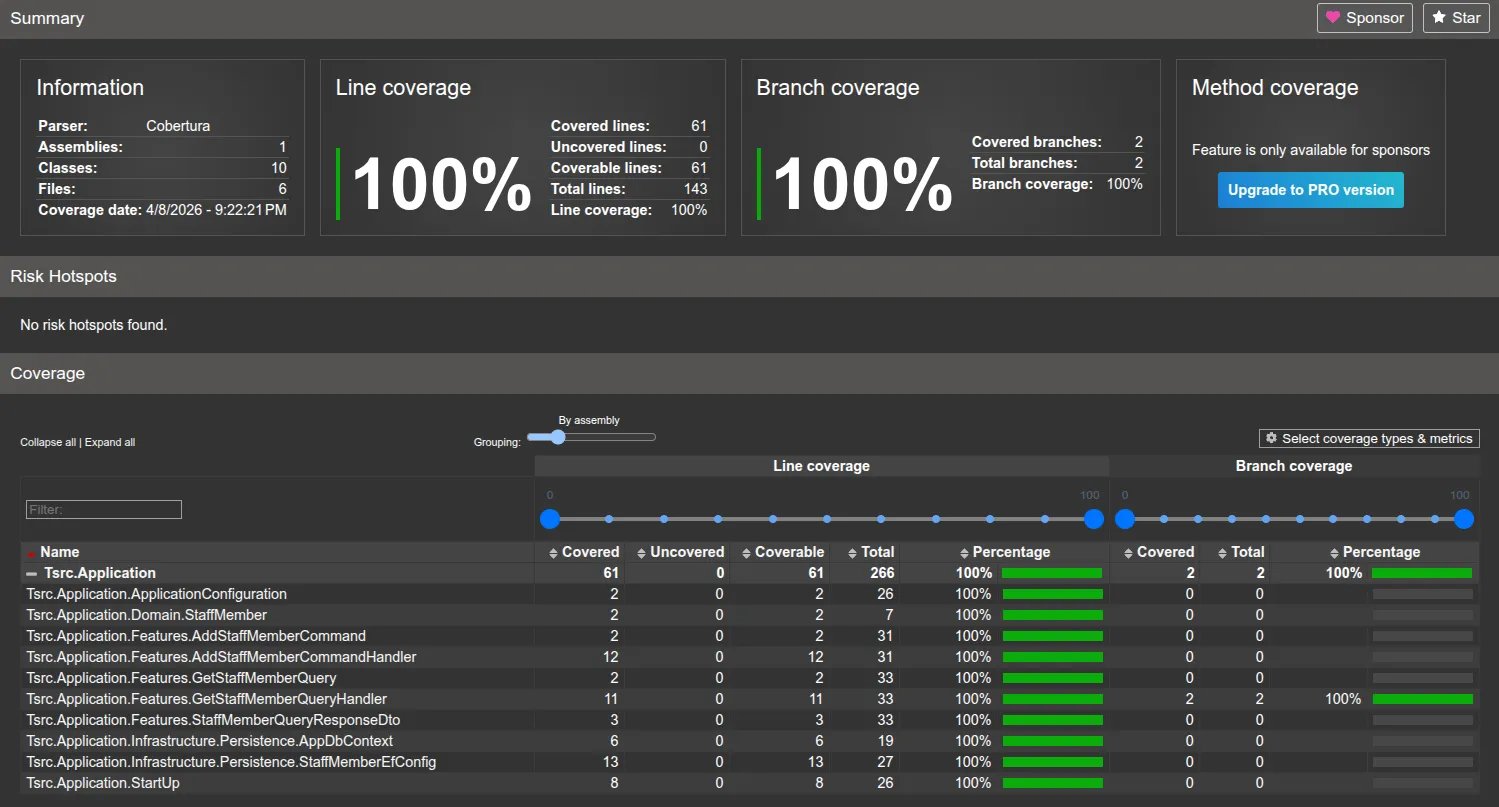
In the next series, I’ll cover something I find especially tricky with integration tests: seeding data. We’ll look at a few practical ways to do it and the trade-offs of each.
Thanks for reading.